Money. Time. Aggravation. Save all 3 with SolarTrak.
October 4, 2017 | Posted in Asset Management
“Misplaced” equipment costs you money by delaying projects, angering customers and giving you a headache.
Here’s the Cure.
Has this ever happened to you? The bulldozer you need is not in the yard. Project Manager thinks it’s in the shop. You waste a few hours looking. Actually it’s at the previous customer’s worksite.
Solve this problem by installing SolarTrak GPS trackers on your construction equipment. SolarTrak trackers were designed specifically for construction and rental equipment. The trackers install on or inside your equipment, and use GPS satellites and cellular service to transfer data to your desktop. Here’s what you’ll be able to do:
- Locate equipment by address or GPS coordinates
- Get notifications (email or text) if and when equipment moves
- See battery status to avoid downed equipment
- Be alerted when equipment is due for routine maintenance
- See engine hours reports for accurate billing
Don’t risk loss of customers and revenue by relying on someone’s faulty memory. Make your fleet last longer by being proactive with fleet maintenance. Make sure the equipment you bill for every moment was being used. Make your job easier.
Best of all, SolarTrak trackers cost just $9.95 per month per tracker. No setup or installation fees. No contacts. Choose to rent or lease.
See for yourself how SolarTrak will save money, time and your own sanity. Request a FREE demo. And start enjoying managing your fleet again.
See SolarTrak at the ICUEE Show in Louisville Oct 3-5
September 5, 2017 | Posted in Trade Shows: Visit Us!
Own construction or utility equipment? Heading to the ICUEE Show? We’d love to show you how SolarTrak GPS trackers can save you time and money!
Stop by the SolarTrak booth #4801 and ask for a free demo. Meet Andrew Chellel and Mike Wimmer, and mention that you saw this invite on our website, and ask for a freebie just for stopping by. We’re convinced that you’ll love what SolarTrak can do for your fleet management – and we’d love the opportunity to convince you, too.
New Feature: Enhanced User Permission Levels
August 22, 2017 | Posted in Product Updates
As more and more customers use SolarTrak, we are getting to know how they are organized and how they use SolarTrak trackers and the data they provide. A few customers made requests, so we have refined the user permissions. You can now create users with read-only access to SolarTrak. You can also opt for users to perform and undo maintenance only.
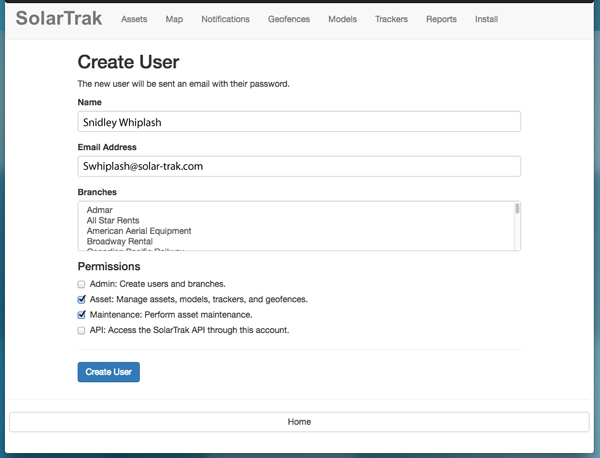
Here’s what’s new:
ADMIN: Users with Admin level rights are able to create, edit and delete other users. They can also create branches. The Admin level is the highest level, and has full access to all the data, so you may want to restrict assigning admin rights.
ASSET: Asset level permission allows access to most of the SolarTrak functions. Asset users can create and modify assets, models and geofences, assign trackers, and assign an asset to a geofence.
MAINTENANCE: Since many SolarTrak clients now use the maintenance alerts and tracking to plan and schedule their service crews, we created a Maintenance level user who can perform and undo maintenance tasks.
API: An API user has access to the public API, allowing the account to be integrated with the company’s ERP system.
All users can edit their own account and view asset histories. To create a read-only user, leave all the user rights option boxes blank. For example, if you check only the maintenance box, you’ll create a user that can only perform maintenance (and none of the Asset or Admin functions).
Have other suggestions? We’re not sitting on our laurels – SolarTrak continues to evolve and improve. Send your suggestions to info@solar-trak.com.