Three Ways Geofences will Make Your Life Easier
April 25, 2017 | Posted in Geofences
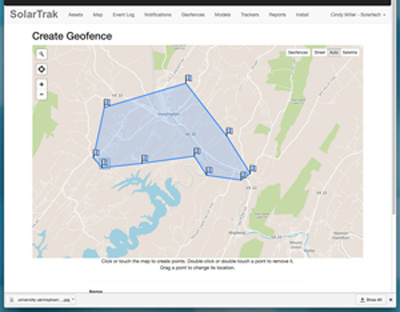
Once you’ve installed SolarTrak GPS trackers, you’ll see why the Geofence feature is one of our most popular, due to its flexibility. A geofence is basically a corral that you create around whatever area you choose. It allows you to determine when and under what circumstances you are notified about equipment movements.
HAVE MULTIPLE LONG-TERM CUSTOMERS?
If you are supplying equipment to on-going projects, you can create a geofence around your customer’s project. Any equipment moving within the fence won’t trigger an alert, but any moving in or out of the perimeters will.
HAVE A COMPLEX ORGANIZATION?
If you share equipment among branches, you can set up a geofence around each and let the branch managers track equipment, while giving yourself rights to view all the assets and geofences. Individualized and master control!
GEOFENCE YOURSELF!
Don’t forget to create a geofence around your own yard. You’ll want to know when your equipment enters and exits the yard. Also allow your repair crew to access the data so they can find equipment that’s due for maintenance.
You can also use the geofence schedule function – and determine the hours when you are alerted. This allows you to be alerted of movements only after your store closes (or whatever time frame make sense to you).
The point is, after establishing a Geofence you can decide what information is sent, to whom, and when. And that’s a pretty handy way to keep tabs on your fleet.
Ask to see Geofences in operation by requesting a Free Demo. Use our contact form, or call 484-223-4994.
External or Internal Antenna? Here’s How to Choose.
April 20, 2017 | Posted in Support & Tech Advice
We like to give customers plenty of choices.
You can get a demo unit to try before you commit. You can choose to rent or buy. But once you’ve seen the value of using GPS trackers on construction equipment, the next question to consider is whether to opt for internal or external antenna.
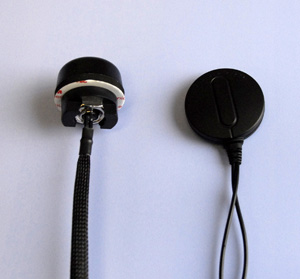
Screw-mount (left) and magnetic antenna
Here’s the trend we’re seeing from our current customers: The standard SolarTrak tracker contains internal GPS and cellular antennas. As long as the tracker can be installed on the roof of your equipment (with access to satellites), the internal antenna is ideal. The tracker will also work mounted under plastic, glass or fiberglass.
However, if your construction equipment takes a beating, or theft is a particular concern, you may want to opt for hiding the tracker in a safer place (under the hood is typical) and using an external antenna to send a receive signals.
There are two version of external antenna – magnetic or screw mount. Magnetic antenna is most often used on vehicles. Screw mount is used where magnets won’t work (plastic, aluminum, fiberglass or other non-metal surfaces), and will involve drilling a small hole to install the antenna.
Examples: our customers use trackers installed on top of generators and air compressors (which are generally parked out of harm’s way), and external antenna on skid steers, boom and scissor lifts.
If you still can’t decide, ask your rep for a copy of our “Complete Installation Guide” (with photos) and see exactly how customers have installed trackers on specific equipment. Or send us your equipment list and we’ll be glad to provide recommendations.
Talk to the SolarTrak Tech Team by calling 484-223-4994. We’d be happy to help you decide.
Welcome to SolarTrak’s Updated Software
April 5, 2017 | Posted in Product Updates
Our SolarTrak GPS tracking system is a growing and changing entity, and – thanks to continual dialog with customers – we’ve identified areas we could make improvements. We’ve freshened the look, the icons and the map – which now also appears on the Assets Page.
One of the most popular additions is a pop-up box that displays multiple assets at one location (for instance, your equipment yard), making it easier to click on a single asset when equipment is parked in a group.
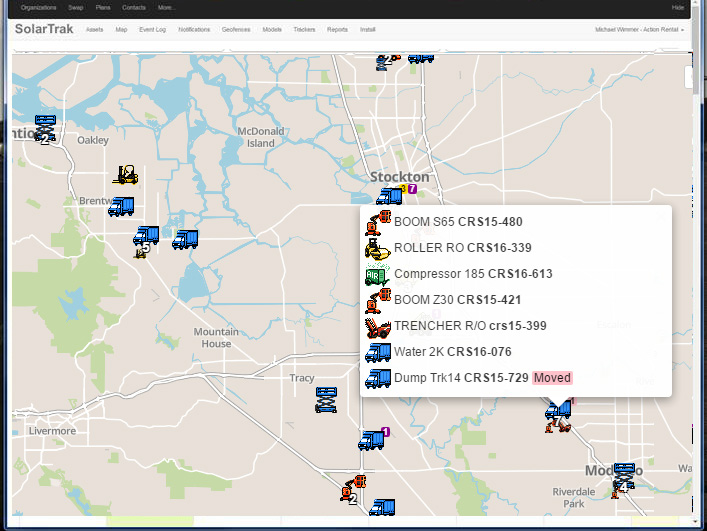
New Pop-Up shows a complete list of equipment when a group of assets are parked in one area
Below are some of the other improvements you can enjoy:
- Mobile-friendly formatting for your smartphone now makes it easy to view data from your handheld devices.
- Improved “Events Log” tab now allows the user to filter by branch, asset type or event.
- While in the “Timeline” tab of the “Assets” page, you can click on either Google or Bing and find step-by-step driving directions to the asset.
- The new “Location Feature” allows users while in the “Map” or “Geofence” views to zero in on a specific location by entering the address of that location.
- The former ‘List View” has been renamed “Assets”, and includes a map and more legible data.
- Our “Reports” tab now allows users to view or download information on assets that will be due for service based on days or engine hours. This will allow for efficient planning of work by your service team.
We hope you agree that these new features make using SolarTrak even easier. If you’d like to send us your thoughts, use the Feedback link on the login page or email info@solar-trak.com. We appreciate your suggestions!