
Here’s How: Download our Complete Installation Guide
February 13, 2017 | Posted in Support & Tech Advice
 Have SolarTrak Trackers ready to install on a variety of rental or construction equipment? Congratulations! You’ve made a wise decision… the sooner you complete the installs, the faster you’ll have valuable info from your GPS fleet trackers.
Not sure how to proceed? We’ve installed hundreds of Trackers, so we’re pretty confident this Complete Installation Guide can help. In it you’ll find pages of photos showing installations on forklifts, trucks, air compressors, boom lifts, shovels, scissor lifts, skid steers and other equipment. We’ve included examples of Trackers with both internal and external antennas.
Download this PDF by clicking on the cover. If you still have questions, call us at 484-223-4994, and ask for the SolarTrak Support Team.
Don’t forget: once you’ve installed the Trackers, you can quickly check your install in the field by using our free App – available for both Apple and Android.
See a SolarTrak Demo at ATSSA Feb. 12-14 in Phoenix
February 6, 2017 | Posted in Trade Shows: Visit Us!
Curious about how SolarTrak can benefit your traffic safety company? Stop by Booth #511 at the ATSSA show in Phoenix and ask to see a demo. We can show you how Traffic Safety houses use SolarTrak to locate, track and manage equipment within a work zone.
Not going to the show? Don’t wait. Call SolarTrak at 484-223-4994 and we’ll arrange a demo just for you.
Follow this Procedure for Disconnecting Tracker from Battery Terminals
December 19, 2016 | Posted in Support & Tech Advice
SERVICE BULLETIN #1 – Use this method when your equipment comes into your shop for routine maintenance, to replace batteries, or anytime the tracker will be disconnected from the battery terminal.
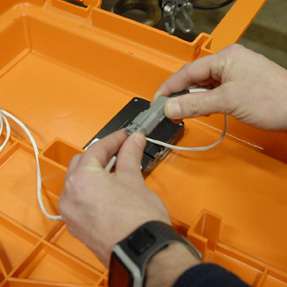
AFTER the Tracker’s power wires are connected to the equipment’s battery terminals, THEN use the gray connector to connect the Tracker to the battery as the LAST step.
Please follow this procedure in this order – to ensure that the Tracker reconnects correctly once the equipment is powered up, avoiding voltage transience from interfering with the Tracker’s boot up process.
STEP ONE: Disconnect tracker wires from the battery terminals
STEP TWO: Disconnect the gray waterproof connector between the battery wires and the tracker
STEP THREE: When maintenance is completed, reconnect the Tracker’s power wires to the equipment’s battery terminal
LAST STEP: Reconnect the gray waterproof connector that links the white power cord to the tracker.
Use this Disconnect and Reconnect Procedure in this order, and your Tracker will boot up correctly. Any questions? Contact the SolarTrak Support Team at 484-223-4994.