
Meet Us in Las Vegas! See us at the CRA show Jan. 30 – Feb. 1
December 12, 2016 | Posted in Trade Shows: Visit Us!
Not sure how SolarTrak trackers will save you time and money? Let us show you. SolarTrak will be at the California Rental Association trade show at booth #1110 – ready to give you a quick demo of how SolarTrak trackers work, and to answer any questions you might have.
Can’t wait? Just call 484-223-4994 now, and we’ll arrange an online demo at your convenience. It’s the perfect way to start the New Year… by monitoring your fleet for a budget-friendly $9.95 per month.
Install Check App released: Easy way to Verify Installs
December 9, 2016 | Posted in Product Updates
 Installing a SolarTech tracker takes a bit of mechanical skill, creativity and sometimes – speed. We know, because our Support Team has assisted with installs at busy rental houses, and catching just the right moment to install a tracker on a popular piece of rental equipment means a quick install is a bonus.
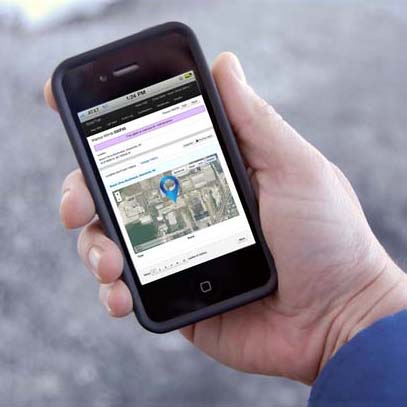
To aid the installers, SolarTech has announced a free Install Check App that makes verifying installation a snap.
The new app is accessible from the installer’s phone at app.solar-trak.com. To check their work, the installer simply enters the serial number of the tracker, and the app will tell them if the tracker has power and if the cellular connection is complete. If the installation is successful, the app also shows the location of the equipment on a map, battery voltage, and the strength of the cellular connection and GPS connections – including how many satellites the tracker can access.
Once the installation has been checked, the user can immediately begin tracking the equipment’s movements, recording engine-hours for accurate billing, receiving reminders if maintenance is due, and even getting a text or email if the equipment moved within a user-defined area (geofence).
So get those trackers installed and your equipment back out there – making money for you. We’re sure the Install Check App will help.
If you ever have questions about installation issues, call us at 484-223-4994. Our experienced Support Team would love to help.
NEW! Improved Waterproof Connector for Easier Installation
August 4, 2016 | Posted in Product Updates
As our GPS fleet tracking system grows, we’re finding ways to make it even easier to install our SolarTrak trackers. We have now eliminated the need for you to install the fuse (it comes already loaded), and made it easier to install the wiring as well as to move trackers from one machine to another.
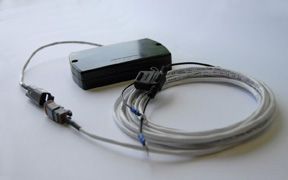 Our new waterproof connector separates the tracker installation from the battery install, allowing you to complete each task, then simply snap the two sections together…. easier!
As more and more trackers are installed, we get feedback from many of our valued customers. We listen, and design improvements. Our goal is to make tracking your construction and rental equipment affordable, economical and easy!
Not yet using SolarTrak? See for yourself how it works. Call 484-223-4994 and ask for a FREE demo (scheduled at your convenience – no obligation).